Try a shorter phrase, or ask apartment assistance for the fastest help.
Contact apartment assistance
Video guides
Recognise the appliance from its image, then open the exact card and press play.
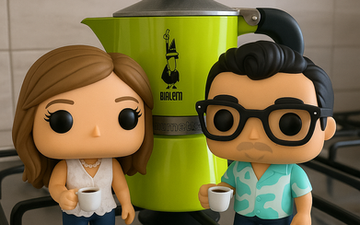

- Fill the bottom chamber with cold water up to the safety valve
- Insert the filter basket and fill with medium-fine ground coffee — do not pack or press down
- Screw the top chamber on tightly by hand
- Place on the gas stove on medium heat
- When coffee starts gurgling and the top fills, remove from heat immediately
- Serve into small espresso cups. Add sugar and stir quickly — the Italian way!
Prefer not to play the video? The complete written instructions are directly above.
Tourist Tip
The Moka pot is an Italian icon invented in 1933 by Alfonso Bialetti. For authentic Italian coffee, use medium-fine ground coffee and keep the heat moderate. You'll find ground coffee in the kitchen drawer.
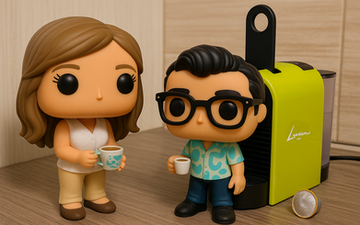
- Fill the water tank at the back of the machine
- Turn the machine on — wait for the light to stop blinking (ready)
- Lift the lever and insert a Nespresso-compatible capsule
- Close the lever firmly to lock the capsule
- Place your cup on the drip tray
- Press the small button for Espresso or the large button for Lungo
Prefer not to play the video? The complete written instructions are directly above.
Coffee Tips
For Roman-style espresso, choose the small cup (Espresso) button. Capsules are in the kitchen drawer. Need more? The nearest Nespresso boutique is at Via del Corso.
- Place food in a microwave-safe container (no metal!)
- Close the door securely until it clicks
- Turn the timer knob to set cooking time
- Press the power level button if you need to adjust (default is full power)
- Press Start — the turntable will begin rotating
- When done, open carefully — contents may be very hot
Reheating Guide
Perfect for reheating leftover pizza from last night! 30 seconds on high for a single slice. For pasta, add a splash of water before reheating to keep it moist.
- Scrape off large food remains (no need to pre-rinse)
- Load dishes in the racks — plates in bottom, cups and glasses on top
- Place cutlery in the basket with handles down
- Add a dishwasher tablet in the dispenser door (tablets are under the sink)
- Press the On/Off button (I/O symbol)
- Press "P" button to select programme — Eco is best for daily use
- Close the door firmly — cycle starts automatically
- Three beeps = cycle complete. Wait 10 min before opening for best drying
Prefer not to play the video? The complete written instructions are directly above.
Eco Tip
Run the dishwasher only when full to save water and energy. The Eco programme takes longer but uses less energy. Tablets are provided under the kitchen sink.
- Insert bread slices into the slots
- Set the browning dial to your preference (1=light, 6=dark — we suggest 3)
- Press the lever down to start toasting
- Toast will pop up automatically when done
- Use the cancel button to stop early if needed
Breakfast Tip
Buy fresh bread from the bakery on Via Ostiense and toast it with Italian butter and local jam for an authentic Roman colazione!
- Place the jug securely on the base unit
- Add ingredients — always add liquid first, then solids
- Secure the lid tightly — hold it while blending
- Select desired speed or use the Pulse button for quick bursts
- Blend until smooth. For ice, always use Pulse mode
- Unplug after use and wash jug immediately
Roman Fresh
Pick up fresh fruit from Testaccio Market (10 min walk) and make amazing smoothies! Roman peaches in summer are incredible.
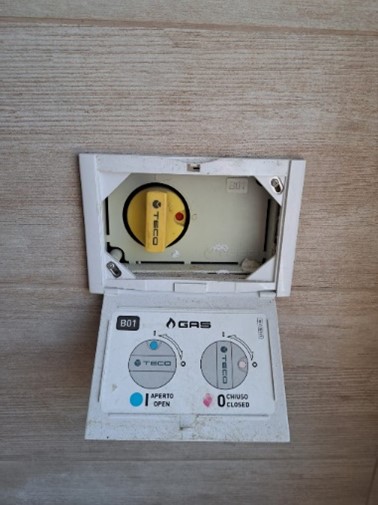
- Open the main gas valve located near the kitchen window (turn perpendicular to pipe = closed, parallel = open)
- Push in the burner knob and turn counter-clockwise to the flame symbol
- While holding the knob pressed, light with the built-in igniter or a lighter
- Keep the knob pressed for 5 seconds AFTER the flame ignites — this activates the safety thermocouple
- Release slowly. If the flame goes out, wait 30 seconds before retrying
- Adjust flame size by turning the knob between min and max
- When done: Turn knob to OFF. Turn off main gas valve when leaving the apartment
Cooking Tips
Italian gas stoves give superior heat control for cooking pasta. Use large pots with plenty of salted water (like the sea!) — Romans say "l'acqua deve sembrare il mare".
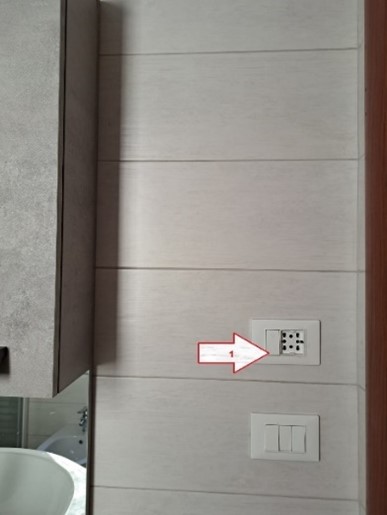
- Locate the wall switch near the kitchen water heater (small white switch)
- Turn ON only when you need hot water at the kitchen tap
- Water becomes hot within seconds — it's an instant heater
- Press the safety button on the tap before turning the hot water handle
- Turn the handle slowly — water gets very hot very fast
- Turn OFF the switch immediately after use to save energy
Energy Tip
This is an instant (tankless) water heater — very efficient because it only heats water when you need it. Perfect for washing dishes or filling a pot for pasta.
- Find the wall switch for the bathroom water heater
- Keep this switch ON continuously during your entire stay
- This ensures instant hot water every time you shower
- The system maintains optimal temperature automatically
- It's energy-efficient even when running continuously — designed for 24/7 operation
Comfort Tip
After a day exploring Rome's cobblestone streets, nothing beats a hot shower! The water pressure is excellent — enjoy a proper Italian doccia.
- Point the white remote at the unit on the wall
- Press the ON/OFF button — a beep confirms activation
- Select mode: Cool ❄️ (summer), Heat ☀️ (winter), Fan 🌀, Dry 💧
- Adjust temperature with ▲/▼ buttons — 22–24°C is optimal
- Set fan speed: AUTO is best for most situations
- Use the Timer button to set automatic shut-off
- Always turn off when leaving the apartment
Roman Climate Tips
Rome summers (Jun–Sep) can hit 35°C+. Cool the room before going out, then turn off. In winter, Heat mode works well — set to 20–22°C.
- Press the ON/OFF button on the white remote
- Set temperature between 20–22°C for comfortable sleep
- Activate SLEEP mode — it gradually adjusts temperature overnight and runs quieter
- Set fan speed to AUTO or LOW for silent operation
- Use the Timer to auto-off after 2–3 hours once you fall asleep
Sleep Tip
Cool the room 30 minutes before bedtime, then switch to Sleep mode. Set timer for 3 hours — the room stays cool long enough to fall asleep comfortably.
- Press ON/OFF on the white remote
- Set temperature to 20–22°C
- Use SLEEP mode for nighttime — quieter and energy-efficient
- Fan speed: LOW or AUTO for sleeping
- Set Timer for auto shut-off
Night Comfort
Aurora bedroom faces the quiet courtyard — naturally cooler and perfect for peaceful sleep. The A/C may not even be needed in spring and autumn.
- Press the power button on the Samsung remote
- Press the Home button to open Smart Hub
- Select your streaming app: Netflix, Disney+, Prime Video, YouTube
- Log in with YOUR OWN account — do not use any pre-logged accounts
- For screen mirroring from your phone: Settings → Connection → Screen Mirroring
- Log out of all accounts before check-out
Entertainment Tips
After exploring Rome, relax with your favourite shows. Try Italian channels for language practice — RAI offers great cultural content!
- Power on with the One Remote control
- Press Home to access Smart Hub and streaming apps
- Log in with YOUR personal accounts only
- For Art Mode: press and hold the power button for 3 seconds — the TV displays artwork like a painting
- Voice control: press the microphone button and speak
- Sleep Timer: Settings → System → Time → Sleep Timer
SmartThings App — Control from Your Phone
No remote? Use your smartphone as a remote via the Samsung SmartThings app:
- Download SmartThings from App Store / Google Play
- Connect to the apartment WiFi (FRITZ!BOX 7530 FH)
- Open app → tap "+" → Device → TV → Samsung
- Select the Frame TV from the list and enter the PIN shown on screen
- You now have full remote control from your phone!
Art Mode
The Frame TV doubles as wall art — browse thousands of artworks or display your own Rome photos! Switch between TV and Art Mode with SmartThings.
- Power on with the One Remote
- Navigate with Smart Hub for app access
- Log in with YOUR OWN accounts only
- Art Mode: hold power button — TV becomes a painting
- Voice commands: press mic button and speak naturally
SmartThings — Same Setup as Aurea
Download SmartThings, connect to WiFi, add device → select Aurora Frame TV. Full remote control from your phone!
Display Your Photos
Upload your Rome holiday photos to the Frame TV via USB or SmartThings app — fall asleep with your own Colosseum sunset!
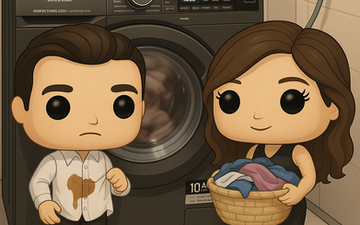
- Open the front door and load laundry into the drum
- Add liquid detergent in the left compartment, softener in the right (products provided)
- Turn the programme dial to Quick 14' for a fast refresh, or 30°C Mixed for a regular wash
- Press the On/Off button
- Press Start/Pause — the door locks and the cycle begins
- When finished, remove clothes promptly to avoid odours
- Leave the door slightly open after use to air out the drum
Prefer not to play the video? The complete written instructions are directly above.
Laundry Tips
Quick 14' is perfect for refreshing clothes after a day of sightseeing. Hang dry on the indoor rack provided — Rome's warm air dries clothes quickly! For dry cleaning, see our laundry services guide.
- Take the vacuum from the corridor closet (it's on the charging dock)
- Check battery: 4 blue lights = fully charged
- Press and hold the power trigger to start cleaning
- Use the floor attachment for tiles, the brush for furniture/curtains
- Press the dust container release button to empty when full
- Return to charging dock after every use
Quick Clean
Great for quick clean-ups — breadcrumbs from breakfast, sand from shoes after the beach. Battery lasts about 30 minutes on normal mode.